This is the multi-page printable view of this section.
Click here to print.
Return to the regular view of this page.
HDTwin Product Family
An introduction to the HDTwin product ecosystem — HDTwin Council and HDTwin studio — and a map of the user documentation.
HDTwin is an opinion-gathering platform that replaces traditional market and social research with Human Digital Twins — synthetic personas that replicate a target population and can be interrogated again and again. This page introduces the two products that make up the platform and explains how the rest of the user documentation is organised.
1. HDTwin at a Glance
Traditional research is linear and expensive: define a problem, recruit a panel, run a survey, analyse the results — then start over for the next question. HDTwin turns this into a build once, ask endlessly model.
The idea is simple:
- A panel of Human Digital Twins is created once from real research data. Each twin is a synthetic persona that reasons and behaves like the population it represents, not a static record of answers.
- That panel can then be used to run any number of deliberations — simulated focus groups and polls in which the twins discuss a topic, vote, and produce an analysed report.
HDTwin delivers faster, scalable, and unbiased insights by moving from one-shot surveys to a reusable population of agents.
2. The HDTwin Product Family
The platform consists of two complementary products, each responsible for one half of the workflow above.
2.1 HDTwin Council
HDTwin Council is the web application in which deliberations happen. A user loads a panel (a .hdt file), defines a topic, and starts a deliberation. The Human Digital Twins in the panel then discuss the topic, vote, and produce a structured report — including consensus and divisiveness analysis — that the user can read and export.
Council is the product you use when you already have a panel and want to run research with it.
2.2 HDTwin studio
HDTwin studio is the framework used to build panels. It is a set of complementary command-line tools, driven by an agentic development environment, that transform source research data (for example survey microdata) into a validated, compiled panel: a collection of synthetic personas packaged as a signed .hdt file.
studio is the product you use when you need to create a panel from research data.
2.3 The fundamental distinction
|
HDTwin studio |
HDTwin Council |
| Role |
Builds panels |
Uses panels |
| Question it answers |
How do I turn research data into a panel of Human Digital Twins? |
How do I run a deliberation with a panel and read the results? |
| Form |
CLI tool framework, driven by an agentic environment |
Web application |
| Input |
Source research data |
A compiled panel (.hdt) |
| Output |
A validated panel (.hdt) |
A deliberation and its report |
| Typical user |
Panel Builder |
Researcher / end customer |
A simple way to remember the split: studio produces the panel, Council consumes it.
3. How Council and studio Relate
The two products are not separate offerings so much as two stages of a single workflow, connected by one shared artifact: the panel.
@startuml
skinparam componentStyle rectangle

rectangle "Source research data" as SRD
rectangle "Panel (.hdt)" as PN
rectangle "Deliberation" as DEL
rectangle "Report" as REP

SRD --> PN : HDTwin studio (build)
PN --> DEL : HDTwin Council (use)
DEL --> REP
@enduml
- studio sits at the start of the pipeline. It takes real research data and reconstructs it into a population of synthetic personas. The result is compiled into a portable, signed
.hdt file.
- Council sits at the end. It takes that same
.hdt file and uses it to run deliberations.
The .hdt file is the contract between the two products: whatever studio produces, Council can run. A panel is built once with studio, then used many times in Council — each new research question becomes a new deliberation on the same panel, with no re-recruitment.
The two products also share the same underlying platform. Both rely on HDTwin-optimised language models reached through a common gateway, and Council’s deliberations are executed by a dedicated hermeneutic engine configured inside each panel.
Conceptually, then, HDTwin is one platform split across two responsibilities — panel construction and panel deliberation — with the panel as the hand-off point between them.
4. Choosing the Right Guide
Which part of the documentation you need depends on what you want to accomplish:
| I want to… |
Read… |
| Run a deliberation: load a panel, start a discussion, read and export the report |
The HDTwin Council application guide — Deliberation |
Build a panel: go from research data to a validated, delivered .hdt |
The HDTwin studio guide — Panel Builder Guide |
| Understand the concepts behind panels, personas, and reconstruction |
The studio guide first; it explains the conceptual model as part of the workflow |
Look up a term (panel, persona, LCM, .hdt…) |
The Glossary |
| Check legal and compliance obligations |
The Compliance section |
If you are an end researcher who has received a .hdt file and simply wants to gather opinions, start with the Deliberation guide. If your job is to create that file in the first place, start with the Panel Builder Guide.
5. Documentation Map
The user documentation is small and organised by product. Each guide is self-contained, but they are best read in the following order:
- This page — the front door: what HDTwin is, and how Council and studio fit together.
- Deliberation — the HDTwin Council application guide. Covers loading a panel, starting a deliberation, and reading the report.
- HDTwin studio — the Panel Builder guide. Covers the end-to-end workflow for building a panel, from source data to a validated
.hdt.
- Glossary — the terms used across the documentation, defined in one place.
Beyond the user guides, the documentation also contains a Compliance section (GDPR, EU AI Act, ethics) that applies to all uses of the platform.
1 - HDTwin Council Application
How to run a deliberation in HDTwin Council: load a panel, configure the topic, start the debate, and read the analysed report.
HDTwin Council lets you run a deliberation — a simulated focus group or poll — with a panel of Human Digital Twins, then explore and share the resulting report.
This guide follows the hosted service at council.hdtwin.eu, from signing in to exporting results. The screenshots show the Italian interface; the English control names used below are translations, and may appear differently if you change the interface language.
Before You Start
To run a deliberation you need:
- Access to HDTwin Council — an account may be required.
- A panel — a compiled
.hdt file. If you do not have one, the Get a demo panel tab offers a demonstration panel, and a personalised demo can be booked from the same tab.
Unfamiliar with terms such as panel, deliberation, or seed comments? See the Glossary.
1. Sign In
Open council.hdtwin.eu and choose one of the sign-in methods offered on the page:
- access token by email;
- Google;
- GitLab.
A panel must be loaded before you can create a deliberation, so the next step follows immediately.
2. Load a Panel
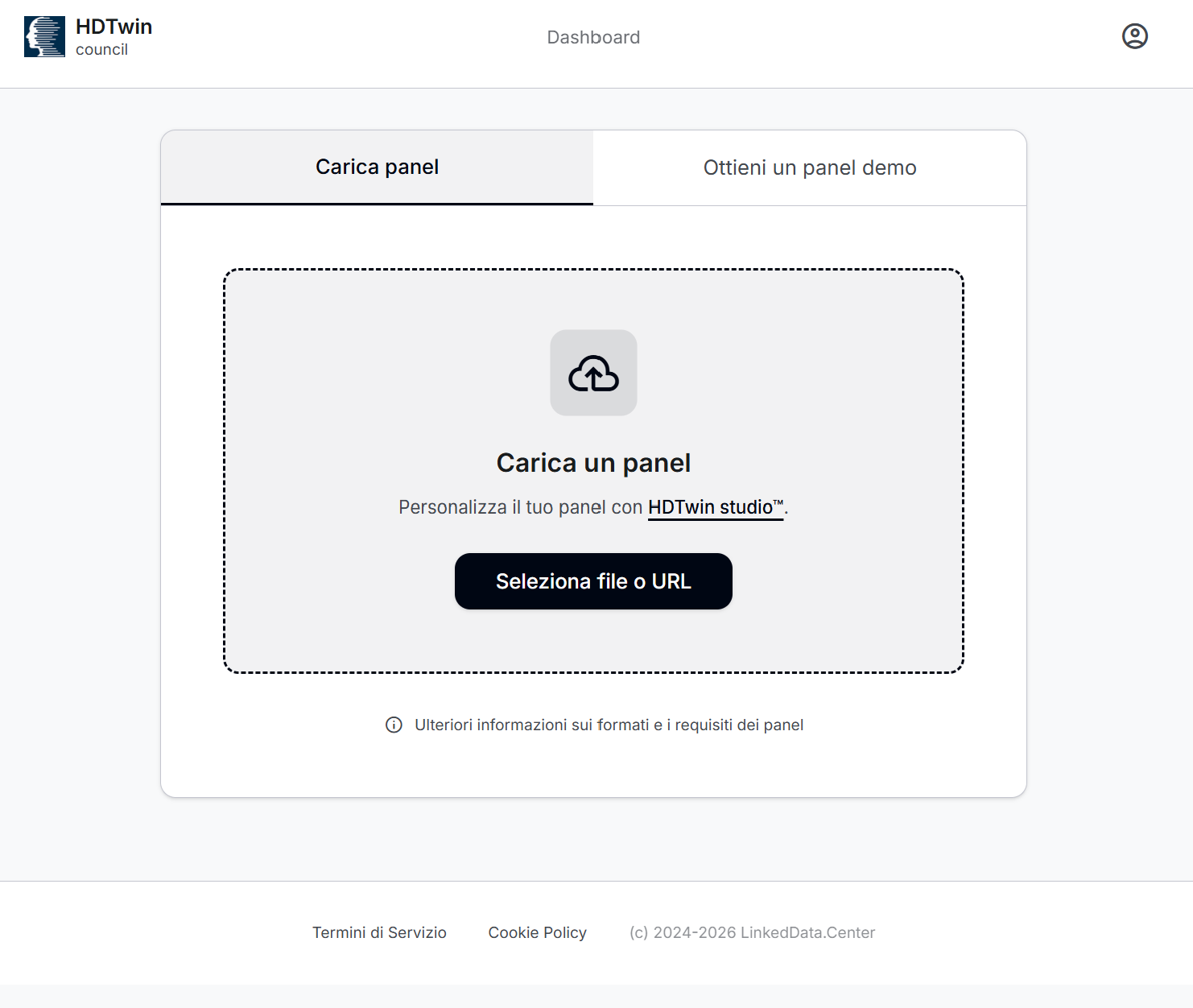
The panel page offers two tabs:
- Upload panel — load a panel from a file or a URL.
- Get a demo panel — use a demonstration panel provided by the service.
To load your own panel, select Select file or URL and choose a .hdt file or enter its URL. If you need to confirm that your panel is supported, use More information about panel formats and requirements. The page also links to HDTwin studio for panel customisation.
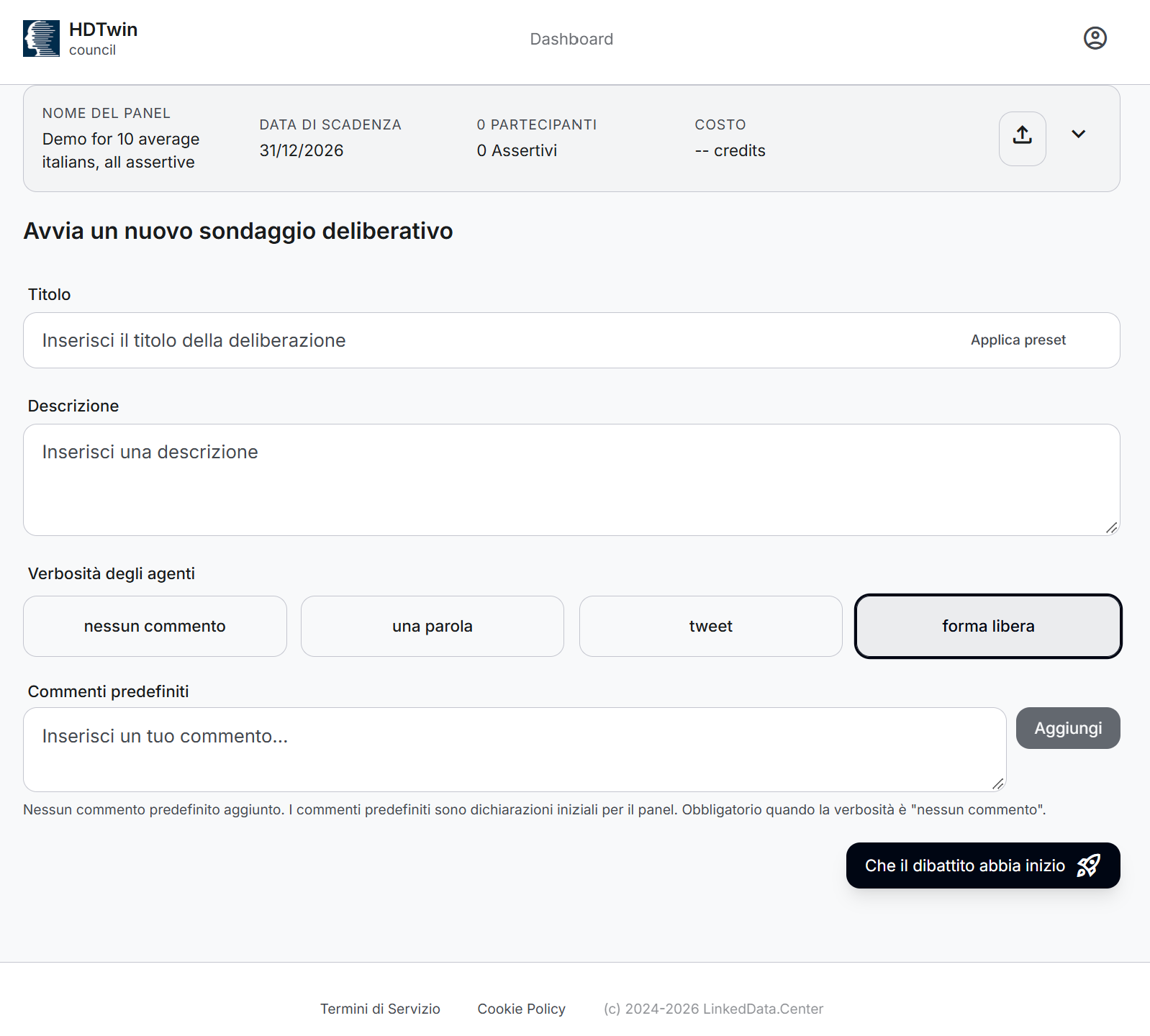
Once the panel loads, the application takes you to the new deliberation form. A panel summary appears at the top of the page; expand it to read the panel’s description and details.
Enter a Title and a Description for the question or topic you want the panel to consider. You can type both yourself, or select Apply preset to populate the form from a preset — then review and edit the values before continuing.
The form offers two further controls:
- Verbosity — the response style you want from the participants: No comments, One word, Tweet, or Free form.
- Predefined comments — the statements the panel starts from, also called seed comments in the Glossary. Enter a statement and select Add to include it, and use the delete icon beside a statement to remove it. Add them when you need them; the form marks them as required when No comments is selected.
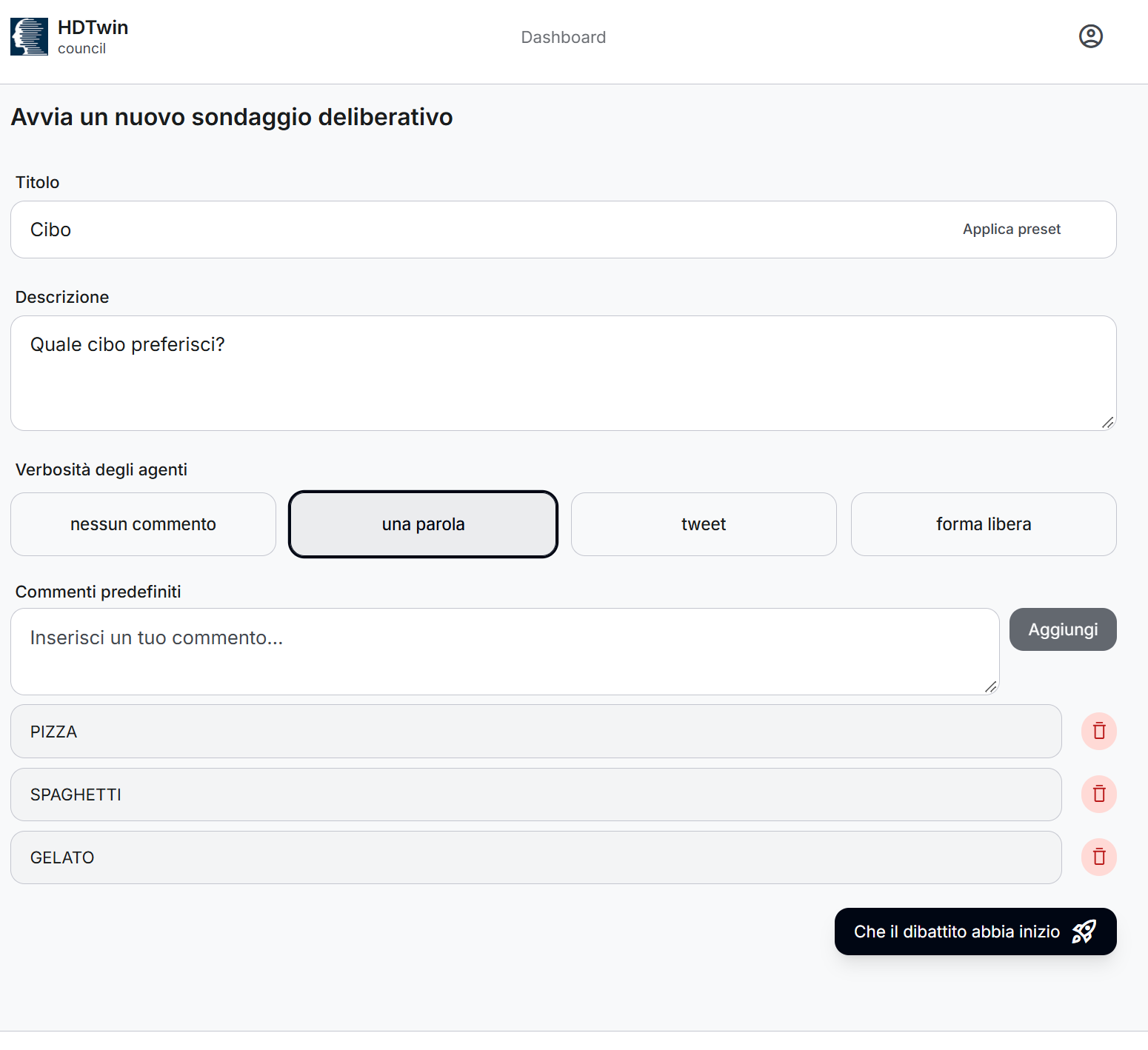
Example
The Food preset fills in the topic and its description, selects One word, and adds PIZZA, SPAGHETTI, and GELATO as predefined comments. These values are an example, not a fixed scenario — change them to suit your own deliberation.
4. Start the Deliberation
When the form is ready, select Start the debate. A confirmation dialog lets you review the panel, the selected verbosity, and credit information before the deliberation begins.
The dialog shows the maximum credit amount and your available balance. The service states that it charges only for actual usage — review the values shown in your session before confirming.

Select Confirm to start, or Cancel to return to the form without starting.
You are then taken to the report page. While the deliberation runs:
- the message “Deliberation is running…” appears at the top of the report;
- the report refreshes every 10 seconds, updating with new votes and statements until all participants have finished.
Completion time varies with the size of the panel. You can stop the deliberation at any time.
5. Read the Report
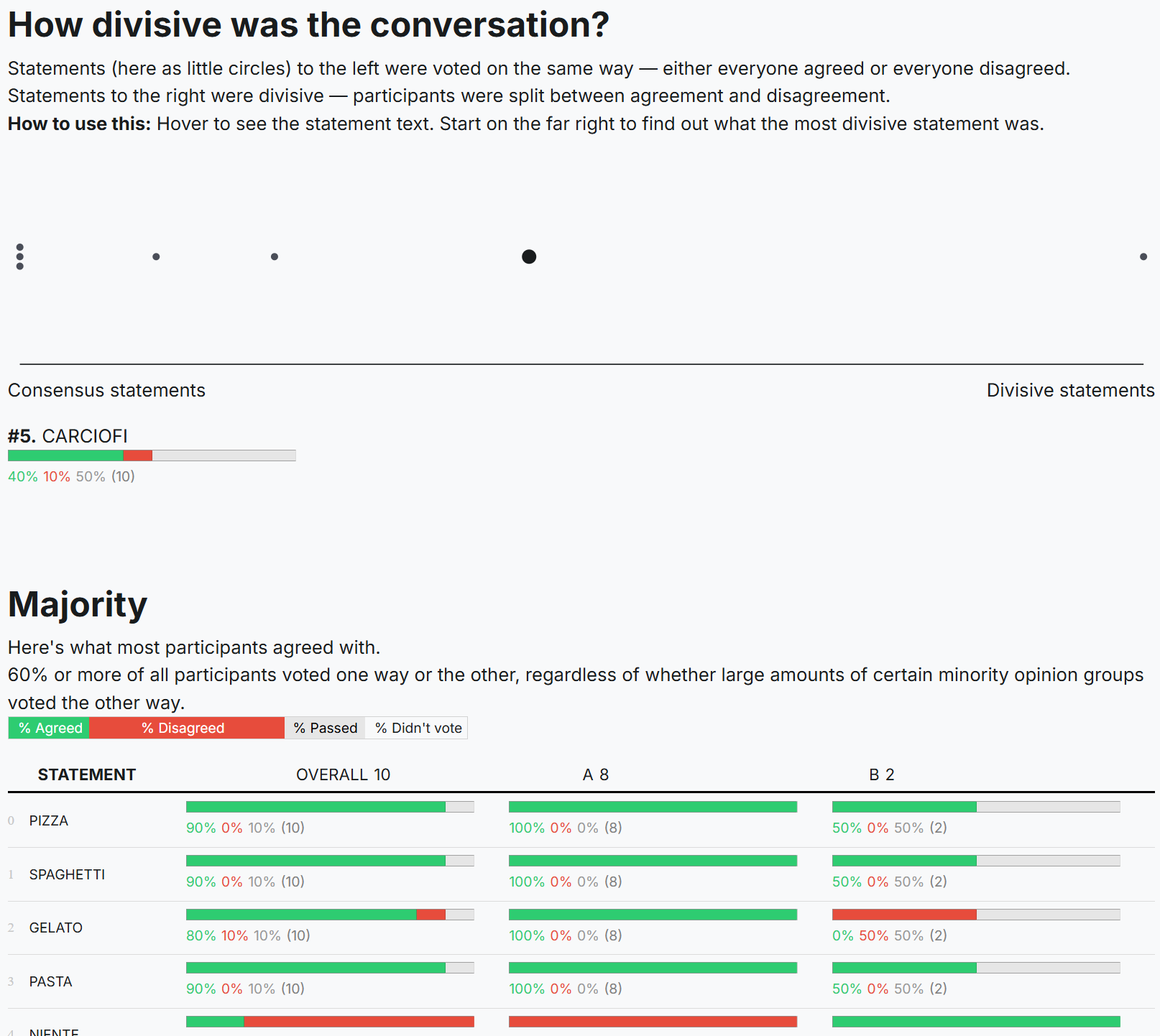
When the “Deliberation is running…” message disappears, the deliberation is complete. The report header shows the topic, its description, the creation date, and an overview of the results.
Depending on the deliberation, the report can include:
- Overview — participation and activity metrics, including voters, votes, statements, and averages.
- Divisiveness — how much consensus or disagreement exists within the panel on the topic, including any detected consensum.
- Panel sentiment — how participants voted on each statement, overall and by opinion group.
- Majority — statements for which at least 60% of participants voted either way.
- Opinion groups — groups of participants whose voting patterns were similar to one another and different from those of other groups.
- Areas of uncertainty — statements that more than 30% of participants passed on.
- Graph — a visualisation of the relationships between statements and participants. Follow the instructions shown alongside the graph to explore it.
The report header also provides these actions:
- Print — opens the browser’s print dialog; use the browser’s Save as PDF destination to keep a PDF copy.
- Export Data — the report’s data export action.
- Dashboard — returns to the deliberation list.

Note
Percentages and group sizes describe the synthetic panel in that deliberation; they are not a survey of real people. The report includes an AI-generated-content disclaimer: its analyses and opinions are generated by AI agents and do not represent the views or judgments of real people.
Fore more information read Understanding HDTwin Council Reports
6. Manage Deliberations
The Dashboard lists your deliberations and their status. A completed deliberation shows its topic, status, participant count, and retention information — select View Report to open its report again.
Note
Reports are kept online for
48 hours and are then deleted automatically, as a safeguard for security and privacy. Save any report you want to keep as a
PDF or as
raw data while it is still available — see
Print and
Export Data in the report header.
Select New Deliberation to start another one. The panel you loaded remains available in the panel summary at the top of the page, so you can reuse it without uploading it again.
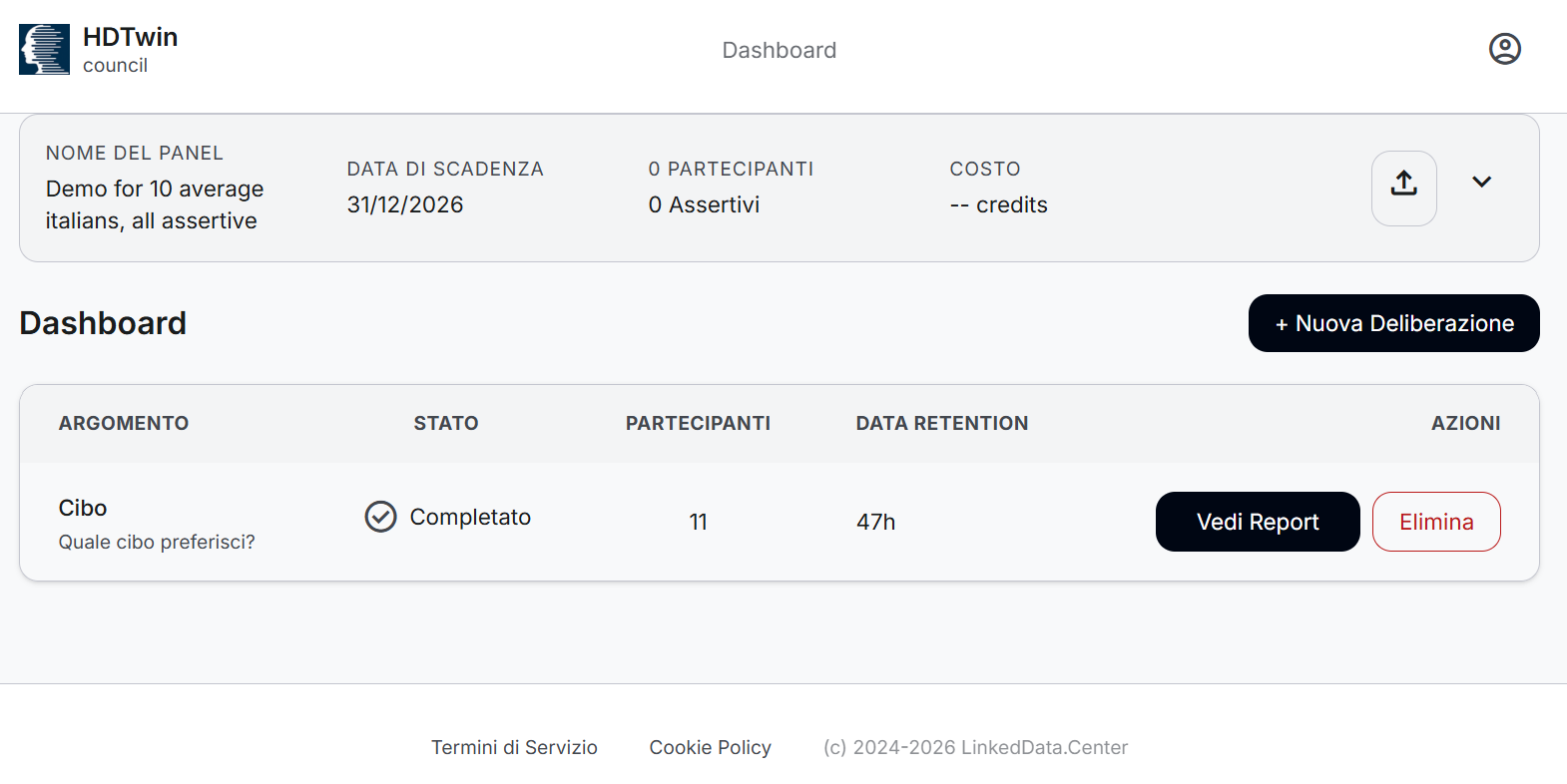
Delete a Deliberation
Select Delete beside a deliberation to open a confirmation dialog. Read the warning carefully: confirming permanently removes that deliberation and cannot be undone. Choose the cancel option to keep it, or confirm to remove it and return to the Dashboard.

7. Next Steps
- To understand where panel files come from and how they are built, read the HDTwin studio Panel Builder guide.
- For data protection and responsible-use obligations when working with synthetic personas, see the Compliance section.
- To look up any term used on this page, see the Glossary.
1.1 - Understanding HDTwin Council Reports
A guide to the structure, contents, and interpretation of deliberation results
1. Introduction
HDTwin Council is a deliberation platform that allows users to explore how a panel of Human Digital Twins (HDTs) responds to a given topic, question, or set of statements.
A Human Digital Twin is an AI-powered synthetic persona designed to reproduce selected characteristics, reasoning patterns, and behaviours of a target population.
During a deliberation, these AI agents can evaluate statements, express agreement or disagreement, and contribute additional statements. The platform then analyses their responses to identify collective patterns, areas of agreement, differences of opinion, and uncertainty.
The HDTwin Council Report presents these results in a structured, visual format, similar to the reports generated by Pol.is.
The purpose of the report is not simply to count votes, but to help users understand:
- Overall sentiment: What does the panel collectively agree or disagree with?
- Consensus: Which opinions are widely shared?
- Opinion diversity: Are there distinct groups with different perspectives?
- Disagreement: Which statements distinguish these groups?
- Uncertainty: Which statements receive inconclusive responses?
- Relationships: How are participants and statements positioned relative to one another based on voting behaviour?
The report describes synthetic deliberation outcomes, not direct responses from real individuals. Its results should be interpreted in the context of the panel used to generate them.
2. General report structure
A Council report is organised into several sections, each providing a different perspective on the deliberation.
| Section |
What it contains |
Main purpose |
| Report header |
Topic, description, creation date |
Identify the deliberation |
| Overview |
Participation and activity statistics |
Understand the scale of the simulation |
| Panel Sentiment |
Voting distributions for each statement |
Examine overall and group-level opinions |
| Majority |
Statements reaching a majority threshold |
Identify broadly supported or rejected positions |
| Opinion Groups |
Groups of agents with similar voting patterns |
Understand different perspectives within the panel |
| Areas of Uncertainty |
Statements frequently passed over |
Identify topics that may require further exploration |
| Graph |
Visual relationships between agents, statements, and opinion groups |
Explore the structure of collective opinions |
Depending on the deliberation and available analysis, the report may also contain a Divisiveness section, describing the overall level of consensus or disagreement and any detected areas of shared agreement.
The following sections explain how to read each component.
The header provides the basic identification information for the deliberation.
It contains three main fields:
| Field |
Description |
| Topic |
The title or name assigned to the deliberation. |
| Description |
A short explanation of the subject, question, or issue being explored. |
| Created |
The date on which the deliberation was created. |
These fields provide context for interpreting the subsequent analysis and help distinguish reports generated from different deliberations.
4. Overview
The Overview section summarises the scale of the deliberation and the level of activity within the synthetic panel.
It introduces three fundamental concepts:
- Participants: The AI agents belonging to the selected panel that take part in the deliberation.
- Statements: Opinions, propositions, or comments presented for evaluation by the participants. Statements can be provided before the deliberation or generated by participants during the process.
- Opinion Groups: Groups of participants identified through similarities and differences in their voting behaviour.
Participation metrics
The section presents a set of numerical indicators:
| Metric |
Meaning |
| Voters |
Number of AI agents that participated by voting. |
| Grouped |
Number of participants assigned to an opinion group. |
| Votes were cast |
Total number of votes expressed during the deliberation. |
| Statements were submitted |
Total number of statements included through participant submissions. |
| Votes per voter on average |
Average number of votes cast by each voting participant. |
| Statements per author on average |
Average number of statements submitted per contributing author. |
How to interpret this section
The Overview provides information about the volume and coverage of the simulation, rather than about its substantive conclusions.
In particular, it helps the reader understand whether the analysis is based on broad participation across the panel, how many statements were evaluated, and how extensively the agents interacted with those statements.
The number of grouped participants also indicates how many participants could be classified into the opinion groups used in the subsequent analysis.
These indicators should not be interpreted as measures of statistical representativeness or confidence.
5. Panel Sentiment
The Panel Sentiment section presents the voting results for individual statements.
This is the most detailed section for understanding how the synthetic panel responds to the propositions being discussed.
Structure of the table
Each row represents one statement. It includes:
- A numerical statement identifier, used to reference the statement elsewhere in the report.
- The complete statement text.
- An Overall column representing the responses of the entire panel.
- Additional columns representing individual opinion groups, identified by letters such as A, B, C, and D.
Each group column also displays the number of participants assigned to that group.
The statements may be sorted according to different criteria, such as the percentage of agreement. Statements excluded by moderation are not included in the Panel Sentiment analysis.
Understanding the voting indicators
Agreed — participants supporting the statement.
Disagreed — participants opposing the statement.
Passed — participants who encountered the statement but chose not to express agreement or disagreement.
Didn’t vote — participants who did not cast a vote on that statement.
The report uses horizontal bars and percentages to represent these voting categories.
Passed and Didn’t vote must be distinguished. Passing is an explicit response, whereas not voting indicates the absence of a recorded vote.
The displayed percentages may not sum to exactly 100% because of rounding and the presence of participants who did not vote.
How to read the results
The reader can examine a statement horizontally to compare how different opinion groups responded to the same proposition.
This makes it possible to identify three important situations:
Broad agreement: Most groups support the same statement, suggesting a common position across the panel.
Broad disagreement: Most groups reject the same statement, revealing a shared negative position.
Polarisation: Some groups strongly support a statement while others reject it, indicating that the statement distinguishes different perspectives within the panel.
A particularly important feature is the distinction between overall sentiment and group-level sentiment. An overall majority can coexist with strong disagreement in a smaller opinion group.
6. Majority
The Majority section identifies statements for which a sufficiently large proportion of the panel has expressed the same position.
In the report format examined, a statement qualifies when at least 60% of all participants agree with it or at least 60% disagree with it.
What this section contains
It uses the same voting representation as Panel Sentiment, showing each selected statement together with its overall and group-level voting distributions.
Unlike Panel Sentiment, it only includes statements that meet the majority threshold.
How to interpret it
This section highlights opinions that are widely supported or rejected within the simulated panel.
It is useful for identifying:
- Common positions that could provide a basis for collective decisions.
- Statements that receive widespread opposition.
- Areas where the overall panel has a clear preference despite differences between opinion groups.
Importantly, majority does not mean unanimity or agreement across all groups.
A statement can qualify for the Majority section even when a minority opinion group strongly disagrees with the prevailing position.
Consequently, the Majority section should be read together with the Opinion Groups section to distinguish broad agreement from positions that may conceal significant differences.
7. Opinion Groups
The Opinion Groups section is one of the central analytical components of the report.
It identifies groups of participants based on similarities in their responses across multiple statements.
How opinion groups are defined
Opinion groups are constructed using two principles:
- Participants within the same group tend to vote similarly across several statements.
- Their voting patterns differ sufficiently from those of participants in other groups.
The resulting groups therefore describe clusters of opinion, rather than predefined demographic or administrative categories.
Each group is identified by a letter and associated with its number of participants.
Structure of the section
For each opinion group, the report provides:
- The group identifier.
- The number of participants assigned to it.
- A selection of statements that distinguish the group.
- Voting distributions for those statements, both overall and across all groups.
These statements are described as those that make the group unique through its voting patterns.
How to interpret it
This section helps the reader understand not only that different opinions exist, but also what differentiates them.
The most informative statements are those where a group’s response contrasts noticeably with other groups.
Comparing these statements makes it possible to describe different perspectives within the panel, such as distinct attitudes, preferences, priorities, or concerns.
These descriptions are interpretations of voting patterns, not predefined labels produced by the clustering itself.
The letters assigned to groups are identifiers. They do not indicate an ordering of importance, quality, or representativeness.
Furthermore, the report does not automatically establish why a group holds a particular position. It identifies the patterns of similarity and difference expressed through voting.
8. Areas of Uncertainty
The Areas of Uncertainty section highlights statements for which participants frequently chose to pass rather than express agreement or disagreement.
In the examined report, statements are included when more than 30% of participants who encountered the statement passed on it.
What this section contains
The section presents the relevant statements using the same voting tables and group comparisons as previous sections.
The focus, however, is on statements that produce relatively high levels of noncommittal responses.
How to interpret it
A high proportion of passes may indicate a topic that deserves additional investigation.
Potential explanations include insufficient information, ambiguity, competing considerations, reluctance to take a position, or a lack of a clear preference.
However, these interpretations are possibilities rather than conclusions directly demonstrated by the report.
Passing should therefore not automatically be interpreted as uncertainty, lack of knowledge, or neutrality.
This section is particularly useful for identifying potential subjects for further deliberation, additional questions, or more detailed research.
9. Graph: Visualising the Opinion Landscape
The Graph section provides a visual representation of the relationships between participants, statements, and opinion groups.
Rather than showing voting percentages in a table, it places participants and statements on a two-dimensional map according to their voting relationships.
Main elements
The graph contains several visual components:
| Element |
Meaning |
| Participants |
Visual markers representing AI agents, potentially displayed in bucketized form. |
| Statements |
Numbered points corresponding to statements in the voting tables. |
| Opinion group labels |
Letters identifying the groups discovered through voting analysis. |
| Group outlines |
Visual indications of the regions associated with different groups. |
| Axes and radial axes |
Visual references supporting interpretation of the spatial representation. |
Different marker shapes distinguish the opinion groups.
How the graph works
The positioning follows two principles described in the report:
Statement proximity: Statements voted on similarly tend to appear closer together.
Participant proximity: Participants with similar voting patterns tend to appear closer together. Participants are also positioned closer to statements they supported and farther from statements they opposed.
As a result, the visualisation provides a map of collective opinion relationships.
How to read the graph
Conceptual illustration only. It demonstrates clusters, participant markers, and numbered statements; it is not a reproduction of the analysed report’s data or layout.
The graph allows the reader to recognise:
- Opinion clusters: Participants with comparable voting behaviour occupy nearby areas.
- Separation between groups: Different regions of the map can indicate divergent voting patterns.
- Statements associated with particular perspectives: Statements can be examined in relation to the participants and groups that support or reject them.
- Potential bridging statements: Statements associated with similar voting responses across multiple groups may reveal shared perspectives.
The graph’s axes should not automatically be interpreted as named political, social, or psychological dimensions. The spatial arrangement primarily describes relationships derived from voting behaviour.
Interactive exploration
In the online report, users can explore the graph through controls for showing or hiding visual elements, including axes, statements, participants, group outlines, and labels.
Statements are identified by numerical codes, allowing the reader to connect the graph to the corresponding voting tables.
The online interface also provides instructions for selecting statements to explore different regions.
A PDF export preserves the visual representation but not the interactive functionality.
10. Divisiveness (when available)
The official HDTwin documentation identifies Divisiveness as an additional report section, although it is not present in the attached example.
This analysis is intended to describe how much agreement or disagreement exists within the panel regarding the deliberation topic.
The documentation also identifies consensum detection, which aims to recognise areas of shared agreement even when the broader subject is divisive.
This section may therefore complement the Majority and Opinion Groups analyses by providing an additional perspective on consensus and disagreement.
Its availability and presentation can vary across reports. The supplied example does not provide enough information to specify a universal divisiveness metric, numerical scale, or calculation method.
11. What kind of data does HDTwin Council produce?
The report can be understood as providing three levels of information.
This includes the topic, description, creation date, activity counts, number of statements, number of voters, and group membership counts.
It establishes what was simulated and the scale of the activity.
This includes statement text and identifiers, agreement and disagreement distributions, passed responses, non-voting indicators, and comparisons between groups.
It provides the primary evidence for identifying patterns in synthetic responses.
This includes detected opinion groups, distinctive statements, majority positions, areas of uncertainty, and spatial relationships in the graph.
These are derived analytical outputs, produced by processing the voting behaviour of the synthetic agents.
| Type of information |
Report representation |
| Deliberation metadata |
Header |
| Simulation activity metrics |
Overview |
| Statements and voting distributions |
Panel Sentiment |
| Collective majority positions |
Majority |
| Similarity-based participant segmentation |
Opinion Groups |
| Statements distinguishing groups |
Opinion Groups |
| Frequent passed responses |
Areas of Uncertainty |
| Spatial relationships between opinions |
Graph |
| Overall agreement and disagreement analysis |
Divisiveness, when available |
The visual report primarily presents aggregated results and derived analyses. It is not, by itself, a complete record of the internal reasoning of every agent, the original panel construction data, or every individual voting event.
12. Recommended reading sequence
A useful way to analyse a Council report is to move from general information toward the structure of disagreement.
- Start with the Overview. Establish the size of the synthetic panel, the number of statements, and the level of participation.
- Examine Panel Sentiment. Identify statements with strong agreement, disagreement, or mixed responses, comparing the overall panel with individual groups.
- Review the Majority section. Identify positions that are broadly supported or rejected across the panel.
- Explore Opinion Groups. Understand which statements distinguish the groups and how their voting patterns differ.
- Check Areas of Uncertainty. Locate statements with frequent passed responses that may deserve further investigation.
- Use the Graph. Explore the overall configuration of opinion clusters and the relationships between participants and statements.
If a Divisiveness analysis is provided, use it alongside the Majority and Opinion Groups sections to assess the overall structure of agreement and disagreement.
13. Interpretation and limitations
A Council report should be understood as an analysis of a simulated deliberation conducted by AI agents.
The report can help identify patterns, formulate hypotheses, explore possible reactions to policy proposals, and compare perspectives within a synthetic population.
However, several distinctions are important:
Synthetic responses versus observed responses. The report records the behaviour of AI-generated personas, not direct observations of actual people during the deliberation.
Majority versus consensus. A majority position does not necessarily imply widespread agreement across all opinion groups.
Opinion groups versus demographic groups. Opinion groups are derived from voting similarities. They should not automatically be interpreted as age groups, occupational categories, political affiliations, or other demographic segments.
Voting patterns versus explanations. A vote indicates agreement, disagreement, or a passed response, but does not necessarily explain the motivations behind the choice.
Visual proximity versus causality. The graph represents relationships between voting patterns. It does not establish causal relationships or provide an independent measure of real-world social distance.
The validity and usefulness of the conclusions also depend on how the underlying HDTwin panel was constructed, configured, and validated.
14. Accessing and exporting results
HDTwin Council provides several actions in the online report interface:
| Action |
Purpose |
| Print |
Print the report or save a PDF version using the browser. |
| Export Data |
Export the deliberation data for further use or analysis. |
| Dashboard |
Return to the list of deliberations. |
The PDF is suitable for reviewing and sharing the structured results. The separate Export Data function is intended for working with the underlying report data; its exact schema should be examined in the exported file rather than inferred from the visual report.
Data retention
Online reports are retained for 48 hours before automatic deletion. Reports or exports that need to be preserved should therefore be saved while available.
15. Conclusion
The HDTwin Council Report transforms the voting behaviour of a panel of synthetic AI agents into a structured representation of collective opinions.
Its main value comes from combining quantitative voting distributions, similarity-based opinion groups, and visual representations of agreement and disagreement.
A reader can use the report to understand what the synthetic panel collectively supports or rejects, where different perspectives emerge, which statements distinguish them, and which areas may benefit from further investigation.
The report should be interpreted as an analytical tool for exploring possible opinion structures and generating insights or hypotheses, rather than as direct empirical evidence of the views of a real population.
2 - HDTwin studio — Panel Builder Guide
End-to-end overview of the HDTwin studio workflow for certified Panel Builders: from research data to a validated, delivered HDTwin panel.
This guide describes the overall process a certified HDTwin Panel Builder follows to design and build an HDTwin panel with HDTwin studio. It is both a practical introduction and a syllabus-style reference for the Panel Builder training program.
It answers one question:
As a Panel Builder, what is the overall process for using HDTwin studio to go from a research/data requirement to a validated HDTwin panel, what tools participate in that process, and what responsibilities remain with me?
It deliberately does not answer:
How do I implement every individual component or manually construct every file?
Implementation details — file formats, schemas, CLI references, personality authoring, and installation commands — belong to the detailed technical documentation and to the hands-on training exercises. This guide is the conceptual map you read before opening those documents.
1. Introduction
1.1 What HDTwin studio is
HDTwin studio is a framework, not a single standalone tool. It is a set of complementary command-line tools that work together as part of a broader workflow. The tools are designed to be integrated into an agentic system — an agentic development environment such as OpenCode, or a similar environment in which a coding agent plans, executes, and supervises a multi-step process.
The purpose of the framework is to transform source research data into a validated HDTwin panel: a collection of synthetic personas (Human Digital Twins) packaged for use in HDTwin deliberation applications.
The framework does not replace the Panel Builder. It provides the mechanical stages; the integrator provides direction, domain judgement, validation, and final responsibility for the delivered panel.
1.2 Who this guide is for
This guide is written for Panel builders and certified HDTwin System Integrators who have completed the official HDTwin training course. It assumes you already have:
- the technical background required to operate the tools;
- the conceptual knowledge of how HDTwin works (panels, personas, the Latent Cognitive Model, deliberation);
- the research/domain awareness needed to judge whether a panel is fit for purpose.
It functions as a reminder of the overall workflow and as a syllabus against which the training program’s learning objectives are organised. It does not re-teach the underlying concepts.
1.3 How the pieces relate
Four distinct things are involved in every panel-building project:
| Element |
What it is |
Role in the workflow |
| HDTwin studio |
The framework: a set of complementary CLI tools |
Performs the mechanical transformations from data to panel |
| The studio tools |
spss, studio, panel |
Each tool owns a defined stage of the pipeline |
| The agentic environment |
An agentic development system (e.g. OpenCode) |
Orchestrates the tools, manages skills, iterates under supervision |
| HDTwin-optimized LLMs |
Language models optimized for HDTwin, accessed through an LLM gateway |
Provide the cognitive-reconstruction and compilation capabilities |
These elements are layered: the tools are driven by the agentic environment, and the tools consume LLM models through the gateway. The integrator sits above all four, directing and validating the result.
@startuml
skinparam componentStyle rectangle

actor "Panel Builder" as SI
rectangle "Agentic environment\n(e.g. OpenCode + project skills)" as AE
node "studio" as ST <<CLI>>
node "spss" as SPSSCLI <<CLI>>
node "panel" as PN <<CLI>>
cloud "HDTwin LLMs" as LLM
collections "HDTwin Studio skills" as SKILLS
file "Calibration data" as SPSS <<SPSS file>> #line.dashed
file Panel #Technology

SPSS .> AE: calibrates
SPSS <. AE: cleans
AE <- SKILLS
SI --> AE : prompts
AE --> ST : invokes
AE --> SPSSCLI : invokes
AE --> PN : invokes

ST --> LLM
SPSSCLI --> LLM
PN --> LLM

AE -U-> Panel

@enduml
2. Prerequisites and Access
2.1 Panel Builder certification and training
Operating HDTwin studio requires certification as a HDTwin Panel Builder, obtained by completing the official HDTwin training course. This guide assumes that certification is in place and that the concepts introduced in training are already understood.
2.2 Required access and environment
To work with HDTwin studio you need:
- a working agentic environment (OpenCode or equivalent) in which the tools can be invoked;
- the HDTwin studio tools installed and available on the command path;
- access to the private package registry from which the tools are distributed;
- an HDTwin API key (see below).
The detailed environment requirements (Python version, package manager, registry authentication) are covered in the individual tool user guides — see Further documentation.
2.3 The HDTwin API key
The studio tools require access to LLM models optimized for HDTwin. These models are accessed through an LLM gateway, and access to them requires an API key issued by HDTwin.
Obtaining the API key implies two obligations:
- Acceptance of the applicable Non-Disclosure Agreement (NDA).
- Compliance with the rules and obligations applicable under the EU AI Act.
The API key is a credential: it must be treated as a secret. HDTwin requirements for handling it include keeping it out of source control and never committing it to a repository. This is an HDTwin requirement, not merely a general best practice.
2.4 NDA and EU AI Act obligations
NDA. Access to HDTwin studio, to the models optimized for HDTwin, and to the underlying panel methodology is subject to the applicable Non-Disclosure Agreement. Certain artifacts produced or handled during panel construction — in particular the panel source definition — are HDTwin intellectual property and must not be distributed outside the authorized channel. See Panel Builder responsibilities.
EU AI Act. HDTwin is classified as a low-risk AI system under the EU AI Act. The integrator’s obligations are therefore primarily about transparency and responsible use:
- synthetic personas (Human Digital Twins) must be clearly identified as AI-generated synthetic personas, never as real individuals;
- the results are generated by an AI system and are probabilistic, not a guarantee of real-world behaviour;
- human oversight is maintained: the integrator (and the end researcher) remain in control of the decisions derived from panel outputs.
The full compliance statement is in the HDTwin EU AI Act compliance document — see Further documentation.
2.5 Security and responsible-use considerations
At a high level, the integrator must respect these principles throughout the workflow:
- Secrets. API keys and cryptographic material stay out of repositories and out of logs.
- Intellectual property. Panel source definitions ship only in compiled form; source is never distributed.
- Synthetic, not real. Synthetic personas and synthetic microdata are never represented as real individuals or recovered observations.
- Epistemic honesty. Inferred characteristics are never silently upgraded into observed facts.
These points are reinforced in the sections that follow where they affect the workflow.
3. The HDTwin studio Framework
3.1 Overview
HDTwin studio is organised as a set of complementary tools, each with a clear, bounded responsibility. The tools are small, command-line programs that read a defined input and write a defined output. Because each stage is separated, the stages can be chained, inspected between steps, and re-run independently.
The framework divides the work into three tool families:
| Tool family |
Purpose |
spss |
Inspect and prepare SPSS datasets, select records, and generate structured respondent inputs |
studio |
Perform the cognitive reconstruction of each respondent into a synthetic persona |
panel |
Assemble and package the personas into a distributable panel |
| Tool |
Responsibility |
Stage of the workflow |
spss respondents |
Generate one structured respondent document per valid record, with study documentation |
Source preparation → input |
spss filter |
Deterministic stratified sampling, retaining columns and supported metadata; optionally reports distribution fidelity |
Source preparation |
spss slice |
Select a contiguous range of records in source order |
Source preparation / inspection |
spss random |
Select records uniformly without replacement |
Source preparation / sampling |
spss extract |
Select records by a regular-expression match on respondent IDs |
Source preparation / selection |
spss info |
Write a dataset codebook, summary statistics, CSV export, or respondent-ID index |
Source inspection |
studio evidence |
Extract explicit observations and constraints from one respondent |
Cognitive reconstruction |
studio reconstruct |
Rebuild the Latent Cognitive Model (LCM) from the evidence |
Cognitive reconstruction |
studio validate |
Diagnostic quality check of an LCM |
Validation (support) |
studio serialize |
Visualise an LCM’s causal graph |
Validation (support) |
studio compile |
Compile the LCM into a natural-language persona (simulation prompt) |
Cognitive reconstruction |
panel compile |
Assemble the panel source and produce the signed, encrypted .hdt |
Packaging |
panel decompile |
Reverse the .hdt back to source (with optional signature verification) |
Packaging (verification) |
The SPSS commands are provided by the spss-core package. Alternative input paths are outside the .sav-based workflow described here.
The tools form a linear pipeline. Each stage’s output becomes the next stage’s input, with a stable one-to-one mapping between respondents preserved from end to end:
@startuml
skinparam componentStyle rectangle

file "survey source" as SS <<SPSS>>  #technology
file "panel source" as PT <<JSON>>  #technology
node "spss filter" as FIL <<CLI>> #line.dashed
node "spss respondents" as S2S <<CLI>>
collections "respondents/" as RES <<JSON>>
node "studio evidence" as SE <<CLI>>
node "studio reconstruct" as SR <<CLI>>
node "studio compile" as SC <<CLI>>
file "personality" as PER <<JSON>>
node "panel compile" as PC <<CLI>>
node "studio test" as TST <<JSON>>  #line.dashed
file "test report" as TR <<JSON>> #line.dashed
file "panel .hdt" as HDT  <<binary>>

node "studio test" as ST <<CLI>>
node "studio verify" as SV <<CLI>> #line.dashed
node "studio serialize" as SER <<CLI>> #line.dashed

SS --> FIL
FIL --> S2S
S2S --> RES
RES --> SE
SE --> SR
SR -> SER
SR --> SV : check
SV ..> SR : retry
SV --> SC
SC --> PER
PER ..> TST
SR --> TST
PER --> PC
PT --> PC
PC --> HDT
TST --> TR

@enduml
The SPSS preparation commands are selected according to the task: spss filter can create a deterministic stratified sample, while spss slice, spss random, and spss extract support other record-selection needs; spss info inspects or exports dataset information. spss respondents then generates structured input documents. From there to panel compile, studio performs a per-respondent fan-out: one survey record becomes one personality. The number of records therefore drives the scale and cost of the project.
3.4 Role of the agentic system
The tools are designed to be used by an agentic system, not by a human typing every command by hand. In practice:
- the agentic environment reads project instructions (e.g. an
AGENTS.md) that declare which commands and skills are available;
- skills encapsulate multi-step recipes (for example, a skill that chains
spss respondents → studio evidence → studio reconstruct → studio compile into one personality per respondent);
- the agent plans the stages, executes them, fans out across many respondents, and reports progress and errors back to the integrator.
The agentic system is an orchestrator. It does not replace the integrator’s judgement; it moves the mechanical work — the repetitive per-respondent loop, the sequencing, the error surfacing — off the integrator’s desk. See Working with an agentic environment.
4. Panel Development Workflow
This section describes the end-to-end process at a high level. Each step is expanded where it matters; implementation detail is deliberately left out.
The workflow proceeds through the following stages, in order:
- Establish the requirement — what panel is needed and why.
- Prepare the source data — obtain, validate, and (if necessary) sample the research data.
- Design the panel — decide the target population, size, and structure.
- Extract respondents — convert source data into per-respondent input records.
- Reconstruct personalities — run the cognitive-reconstruction pipeline.
- Validate — check structural consistency and behavioural quality.
- Assemble and package — combine personalities into a panel and compile it.
- Verify and deliver — confirm the package and hand it over.
4.1 Starting from source research/data
Every panel starts from a research question and a source of data about a target population. Two common entry points exist:
- Survey microdata — an existing survey dataset (e.g. an SPSS
.sav file) of real respondents. The panel is built to represent this surveyed population.
- Aggregate statistics — published statistics describing a population (from a report or document). Here the integrator first reconstructs a synthetic microdataset, then proceeds as if it were survey data.
The distinction matters for compliance: survey microdata represents real observations, whereas microdata reconstructed from aggregate statistics is synthetic and must be labelled and treated as such throughout.
Before reconstruction begins, the source data is prepared:
- Validation — confirm the source is readable, well-formed, and of the expected type.
- Sampling — when the source population is larger than the intended panel, draw a representative, deterministic sample. Sampling preserves the distribution of key stratification variables and produces a fidelity report so the integrator can confirm the sample still represents the source.
Preparing inputs is where the integrator makes the first meaningful research decision: which variables define the population’s structure, and how large the panel should be. Sampling is a research choice, not merely a mechanical one.
4.3 Designing the panel
Design decisions are made up front and recorded:
- Population scope — who the panel is meant to represent.
- Panel size — how many personas.
- Structure — which stratification or segmentation the panel must reflect.
- Context — any global context that should frame the panel’s deliberations.
- Delivery target — the tenant and engine the panel will run against.
Most of these are captured later in the panel source definition, but they should be decided here, before reconstruction begins.
With inputs prepared and the design decided, the tools execute the transformation:
spss respondents (or the equivalent entry path) produces one structured respondent record per individual, each carrying its own study documentation. Use the other spss commands as appropriate to inspect, sample, or select records before respondent generation.- For each respondent,
studio runs the cognitive-reconstruction stages: evidence extraction, then reconstruction of the Latent Cognitive Model, then compilation into a natural-language personality.
- The result is a directory of personalities, one per respondent, with traceable one-to-one mapping back to the source record.
4.5 Generating and configuring the panel
The personalities are then assembled into a panel. The panel source definition combines:
- panel metadata (identifier, description, expiry, tenant, engine);
- a model configuration that includes the personalities as members, any shared context, and any optional configuration for biased contexts;
- optionally, example deliberation seeds.
The panel tool then compiles this source into the distributable form.
4.6 Validation and review
Validation is a distinct stage, not an afterthought. It happens at two levels:
- Structural validation, performed by the tools (consistency checks on the model, diagnostic quality checks on each LCM).
- Human review, performed by the integrator (do the personalities behave plausibly? does the panel represent the population? are the outputs defensible?).
Validation is covered in depth in Validation and Quality Assurance.
4.7 Iteration
Rarely is a panel correct on the first pass. The workflow is iterative:
- a validation check surfaces a problem in a specific personality or in the panel structure;
- the integrator directs a targeted re-run (a single respondent, a single stage, or a design change);
- the result is re-validated.
The per-stage, per-respondent structure of the tools is what makes targeted iteration cheap: a failure in one personality does not force a full rebuild.
4.8 Packaging and delivery
Once the panel passes validation, it is packaged:
- the panel source is compiled into a signed and encrypted
.hdt file;
- the model payload is encrypted at rest (HDTwin IP protection);
- the file is signed so its integrity and origin can be verified.
Delivery means handing over the .hdt file to the consumer (the deliberation application or the end researcher). The source definition is retained by the integrator/HDTwin and is not distributed.
5. From Source Data to Panel
This section generalises the workflow exemplified by the process of building a panel from a survey dataset. It describes the transformation conceptually; the specific example, tool invocations, and file formats are intentionally omitted.
@startuml
skinparam componentStyle rectangle

rectangle "Research requirement" as RR
rectangle "Source data" as SD
rectangle "(sampling)" as SM
rectangle "Input records" as IR
rectangle "Cognitive reconstruction" as CR
rectangle "Personas\n(one per record)" as PR
rectangle "Panel assembly" as PA
rectangle ".hdt" as HDT
rectangle "delivery" as DL

RR --> SD
SD --> SM
SM --> IR
IR --> CR
CR --> PR
SD --> PA
PR --> PA
PA --> HDT
HDT --> DL
@enduml
The whole pipeline converts research requirements plus source data into a functional HDTwin panel. The key conceptual shift happens in the middle: raw data is not simply reformatted; it is reconstructed into personas that can behave consistently on questions the survey never asked.
5.2 From records to personas: why reconstruction
A survey record is a sparse set of observations about a person. Those observations are manifestations of a much richer internal system — values, motivations, trust relationships, world model, reasoning style. A panel that merely repeats the recorded answers cannot answer new questions; it falls back on demographic stereotypes.
HDTwin studio therefore does not translate records into text. It treats each record as incomplete evidence and reconstructs the hidden cognitive system most likely to have produced it, then compiles that system into a persona — a natural-language simulation prompt.
@startuml
left to right direction
skinparam componentStyle rectangle

rectangle "record\n(observations)" as REC
rectangle "Latent Cognitive Model\n(reconstructed system)" as LCM
rectangle "persona\n(compiled prompt)" as PER

REC --> LCM
LCM --> PER
@enduml
This is the single most important concept for the integrator to internalise: the product is the reconstructed model, not a paraphrase of the survey. Quality is judged on the reconstructed reasoning, not on how closely the prose resembles the original answers.
5.3 The evidence boundary
Reconstruction distinguishes inference from fabrication:
- Inference extends observable evidence using psychologically plausible reasoning, and is permitted.
- Fabrication (hallucination) introduces detail the evidence cannot support, and is prohibited.
The integrator’s validation work is, in large part, guarding this boundary: confirming that each inferred characteristic is plausibly supported by the evidence, and that unsupported detail has not crept in.
The same discipline applies at the data level. When working from aggregate statistics, every value must carry a provenance: observed, derived, assumed, or simulated. These categories must never be conflated — a synthetic value must never be presented as an observed one.
5.4 Generalisation from a concrete example
The reference workflow (building a panel from a survey dataset) is one concrete instance of a general pattern:
- Acquire a source describing the target population.
- Prepare it (validate, and sample to the intended panel size, preserving structure).
- Extract one input record per panel member.
- Reconstruct each record into a persona.
- Assemble the personas into a panel definition.
- Compile the definition into a distributable panel.
- Deliver the compiled panel.
The same pattern holds regardless of the source format or the specific research domain. The tools that change are those in step 1–2 (how source data is acquired and prepared); steps 3–7 are stable across projects.
6. Working with an Agentic Environment
HDTwin studio tools are command-line tools designed to be invoked by an agentic system, not interactively. In the intended workflow:
- the integrator states the goal and the research requirements;
- the agentic system plans the stages, invokes the tools, fans out across respondents, and reports back;
- the integrator reviews results, directs changes, and signs off.
A concrete illustration: rather than a human running the per-respondent loop hundreds of times, the agentic environment executes the loop, parallelises where appropriate, and surfaces only the outcomes and problems that need the integrator’s attention.
6.2 The role of the Panel Builder
Within this arrangement, the integrator’s role is to supervise and guide, not to type commands:
- Set direction. Define the requirement, the population, the design decisions.
- Provide domain judgement. Decide which variables matter, what “representative” means, and whether a persona is behaviourally plausible.
- Gate the process. Decide when a stage’s output is acceptable and when to re-run.
- Own the outcome. Take responsibility for the delivered panel.
6.3 Separation of concerns
A clean separation runs through the whole workflow:
| Activity |
Who performs it |
| Executing tool stages (deterministic transformations) |
The agentic system / tools |
| LLM-based reconstruction and compilation |
The tools, via the gateway |
| Judging research validity and plausibility |
The Panel Builder |
| Signing off a panel for delivery |
The Panel Builder |
Automation is appropriate for anything mechanical, repeatable, and verifiable by rule. Human intervention is required wherever a judgement call is involved — population definition, acceptability of inference, readiness for delivery. See When to rely on automation and when human intervention is required.
7. Validation and Quality Assurance
Validation is where the integrator earns the “certified” in the job title. It is not a single check at the end; it runs in layers throughout the workflow.
7.1 Conceptual validation stages
Validation happens at three conceptual levels:
| Level |
Question it answers |
Performed by |
| Consistency & completeness |
Is the artifact structurally sound and complete? |
Tools (deterministic checks) |
| Distribution fidelity |
Does the sample/panel represent the source population? |
Tools (statistical report) + integrator |
| Behavioural/research validity |
Would the reconstructed personas behave plausibly and defensibly? |
Integrator (with tool support) |
7.2 Consistency and completeness checks
The tools enforce structural consistency automatically:
- Input validation — source records must conform to the expected contract; invalid records stop the run rather than producing partial output.
- Model checks — the panel model is checked for internal consistency (for example, that references between configuration elements are valid).
- Output safety — compiled personas are checked to ensure they are plain prose, contain no leaked schema or identifiers, and carry no unsafe instructions.
- Sampling fidelity — the sampling step reports the divergence between the sample and the source distribution.
These checks are deterministic and reproducible. They are necessary but not sufficient: passing them does not mean the panel is good; it means the panel is well-formed.
7.3 Diagnostic quality checks on the reconstruction
studio provides a diagnostic quality check on each Latent Cognitive Model. It evaluates the model against a checklist and reports a pass, warning, or failure, with issues and recommendations when it fails. This is a diagnostic aid for the integrator, not an automatic gate: it flags likely problems and suggests what to revisit.
7.4 Behavioural / research validation
The most important validation is judgement-based and cannot be fully automated. Because a synthetic persona has no single ground truth to compare against, validation asks whether the reconstructed system can reliably generate psychologically plausible behaviour. The integrator assesses, at minimum:
- Evidence fidelity — does the persona faithfully reflect the available evidence, without contradiction?
- Internal coherence — do opinions emerge from deeper motivations, or are they a flat list of traits?
- Generalisation — does the persona behave consistently across unseen situations?
- Stability — does it resist drifting or contradicting itself over a long interaction?
- Psychological realism — does it resemble a plausible, ambivalent human, rather than a demographic stereotype?
- Hallucination resistance — are unsupported or stereotypical inferences absent?
A useful working test: pick a question the source never asked, and ask whether the persona’s answer would follow plausibly from its reconstructed reasoning. A persona that reasons its way to an answer is good; a persona that pattern-matches to a demographic shortcut is not.
7.5 Iterative refinement
Validation findings feed back into the workflow. Refinement is targeted:
- a structural failure in one stage → re-run that stage;
- a specific personality that fails review → re-run that respondent;
- a population-level problem (the sample is unrepresentative, the design is wrong) → return to design.
Because stages and respondents are independent, a targeted fix does not force a full rebuild.
7.6 Criteria for considering a panel ready for delivery
A panel is ready to deliver when all of the following hold:
- The source data is valid and its provenance is documented.
- The sample (if any) is verified to represent the source population.
- Every persona passes the structural/consistency checks.
- Behavioural review confirms the personas are plausible, coherent, and evidence-grounded.
- The panel model is internally consistent.
- The panel compiles successfully into a signed, encrypted
.hdt.
- The integrator has reviewed the panel as a whole and accepts responsibility for it.
Only then should the .hdt be handed to the consumer.
8. Panel Builder Responsibilities
The Panel Builder is accountable for the panel. The tools execute; the integrator decides and answers for the result. Responsibilities fall into four groups.
8.1 Technical responsibilities
- Ensure the environment and tools are correctly set up and configured.
- Ensure source data is valid and prepared correctly.
- Oversee the correct execution of the pipeline, including fan-out and error handling.
- Ensure the panel compiles and verifies correctly.
- Protect secrets and cryptographic material.
8.2 Research / domain responsibilities
- Translate the research requirement into a concrete panel design (population, size, structure).
- Choose the variables and stratification that define representativeness.
- Judge whether the sample and the resulting panel faithfully represent the target population.
- Interpret and act on distribution-fidelity and quality reports.
8.3 Validation responsibilities
- Review personas for behavioural plausibility and evidence grounding.
- Guard the inference/fabrication boundary.
- Confirm the panel as a whole is fit for its intended research purpose.
- Decide when the panel is ready for delivery.
8.4 When to rely on automation and when human intervention is required
| Situation |
Automation (agentic system / tools) |
Human (integrator) |
| Reading, validating, sampling source data |
✓ |
interprets results |
| Fanning out reconstruction across respondents |
✓ |
monitors |
| Consistency, completeness, output-safety checks |
✓ |
responds to failures |
| Distribution-fidelity report |
✓ (generated) |
✓ (judged) |
| Choosing population, size, stratification |
|
✓ |
| Judging persona plausibility and evidence grounding |
|
✓ |
| Deciding a failed diagnostic is acceptable in context |
|
✓ |
| Signing off delivery |
|
✓ |
A simple rule: if a decision has a research or ethical consequence, it is the integrator’s. Automation is for the mechanical and the rule-checkable.
8.5 Compliance and governance responsibilities
- Maintain the NDA obligations, including protecting panel source definitions and model IP.
- Respect EU AI Act obligations: label synthetic personas as synthetic, maintain human oversight, and avoid representing synthetic output as real.
- Preserve the evidence boundary: never present synthetic or inferred information as observed fact.
- Keep secrets out of repositories and logs.
9. Training Syllabus / Learning Path
This section reorganises the preceding material as a progression of skills a certified Panel Builder should master. It is intended as a reference for the HDTwin training course, and as a self-assessment checklist.
9.1 Understanding (the conceptual foundation)
The integrator understands:
- what HDTwin studio is (a framework of tools) and how it differs from a single tool;
- the roles of the agentic environment, the studio tools, and the HDTwin-optimized LLMs;
- the pipeline: source data → respondents → evidence → Latent Cognitive Model → personas → panel →
.hdt;
- why reconstruction (not translation) is the core method, and what the Latent Cognitive Model represents;
- the distinction between inference and fabrication, and the evidence boundary.
9.2 Operating (running the workflow)
The integrator can:
- establish the requirement and translate it into a panel design;
- prepare and sample source data, and interpret the fidelity report;
- direct the agentic environment through the pipeline stages;
- manage fan-out, parallelism, and error recovery;
- assemble and compile a panel.
9.3 Validating (assuring quality)
The integrator can:
- run and interpret the structural consistency checks;
- use the diagnostic quality check and act on its findings;
- conduct behavioural/research review of personas;
- apply the readiness criteria and decide whether a panel is deliverable.
9.4 Delivering (owning the outcome)
The integrator can:
- package the panel into a signed, encrypted
.hdt;
- verify the package;
- deliver it correctly, protecting source definitions;
- discharge the compliance and governance responsibilities (NDA, EU AI Act, provenance).
9.5 Skills checklist
| Area |
Skill |
Evidence of mastery |
| Understanding |
Explain the framework and pipeline |
Can describe the end-to-end flow and name each tool’s role |
| Understanding |
Explain reconstruction vs translation |
Can state why the model, not the prose, is the product |
| Operating |
Prepare source data |
Produces a valid, documented, sampled input |
| Operating |
Drive the pipeline |
Directs an agentic run end-to-end |
| Validating |
Judge behavioural quality |
Distinguishes evidence-grounded inference from fabrication |
| Validating |
Apply readiness criteria |
Defends a deliver/not-deliver decision |
| Delivering |
Package and hand over |
Produces a verified .hdt, protects source and secrets |
| Delivering |
Comply with obligations |
Applies NDA, EU AI Act, and provenance rules |
10. Further Documentation
This guide is an overview and training-oriented document. It is not a replacement for the detailed technical documentation.
The hands-on details — CLI references for spss, studio, and panel, the rationale behind cognitive reconstruction, the panel and respondent data models, and the .hdt format specification — are covered by the detailed tool documentation and the hands-on exercises provided with the official HDTwin Panel Builder training course, and are intentionally out of scope here. See the SPSS User Guide for command usage and options.
Related pages in this documentation portal:
3 - Glossary
Definitions of the terms used across the HDTwin documentation.
This page defines the terms used across the HDTwin documentation. Terms are grouped by theme and listed alphabetically within each group.
Core Concepts
Deliberation
A simulated focus group or poll run in HDTwin Council: the Human Digital Twins in a panel discuss a topic, vote on statements, and produce an analysed report.
Human Digital Twin (HDT)
A synthetic persona — an AI agent that replicates the characteristics, reasoning, and behaviour of a member of a target population. Human Digital Twins are clearly AI-generated and never represent real, identifiable individuals.
Panel
A collection of Human Digital Twins representing a target population, built once from research data and reusable for any number of deliberations. Panels are distributed as signed, encrypted .hdt files.
Persona (personality)
The compiled, natural-language form of a single Human Digital Twin — the simulation prompt produced by the cognitive-reconstruction pipeline. Used interchangeably with “personality” in the studio documentation.
HDTwin Council
The HDTwin web application in which deliberations happen. Users load a panel, define a topic, and read the analysed report.
HDTwin studio
The framework of command-line tools used by Panel Builders to build panels from source research data. Organised in three tool families: studio-tools (source preparation), studio (cognitive reconstruction), and panel (assembly and packaging).
Hermeneutic engine
The dedicated deliberation engine, configured inside each panel, that executes Council’s deliberations.
LLM gateway
The common access point through which the studio tools consume the HDTwin-optimised language models. Access requires an API key issued by HDTwin.
Panel Builder
A certified professional who designs, builds, validates, and delivers HDTwin panels using HDTwin studio. Certification is obtained by completing the official HDTwin training course.
.hdt file
The compiled, signed, and encrypted distribution format of an HDTwin panel. It is the contract between the two products: whatever studio produces, Council can run.
Evidence
The explicit observations and constraints extracted from one source respondent record, used as the input to cognitive reconstruction. Reconstruction distinguishes inference (extending evidence plausibly — permitted) from fabrication (introducing unsupported detail — prohibited).
Latent Cognitive Model (LCM)
The reconstructed internal system of a respondent — values, motivations, trust relationships, world model, reasoning style — inferred from the evidence. The LCM, not a paraphrase of the source answers, is the real product of the reconstruction stage.
Seed comments
Statements pre-loaded into a deliberation at creation time. The Human Digital Twins take them into account during the discussion and may add further statements of their own.
Source research data
The input to panel construction: typically survey microdata (e.g. an SPSS .sav file) or aggregate population statistics from which a synthetic microdataset is first reconstructed.
Analysis and Quality
Bias sterilization
HDTwin’s proprietary layer that filters harmful language, corrects stereotypical response distributions, and keeps agents within the logical guardrails of their persona. See Ethics & AI Safety.
Consensum detection
The automatic identification of areas of agreement within a panel, even on highly divisive topics. Surfaced in the divisiveness analysis of a deliberation report.
Divisiveness
A report metric describing how much consensus or disagreement exists within the panel on a given topic.
Provenance
The recorded origin of a data value: observed, derived, assumed, or simulated. These categories must never be conflated — a synthetic value must never be presented as an observed one.